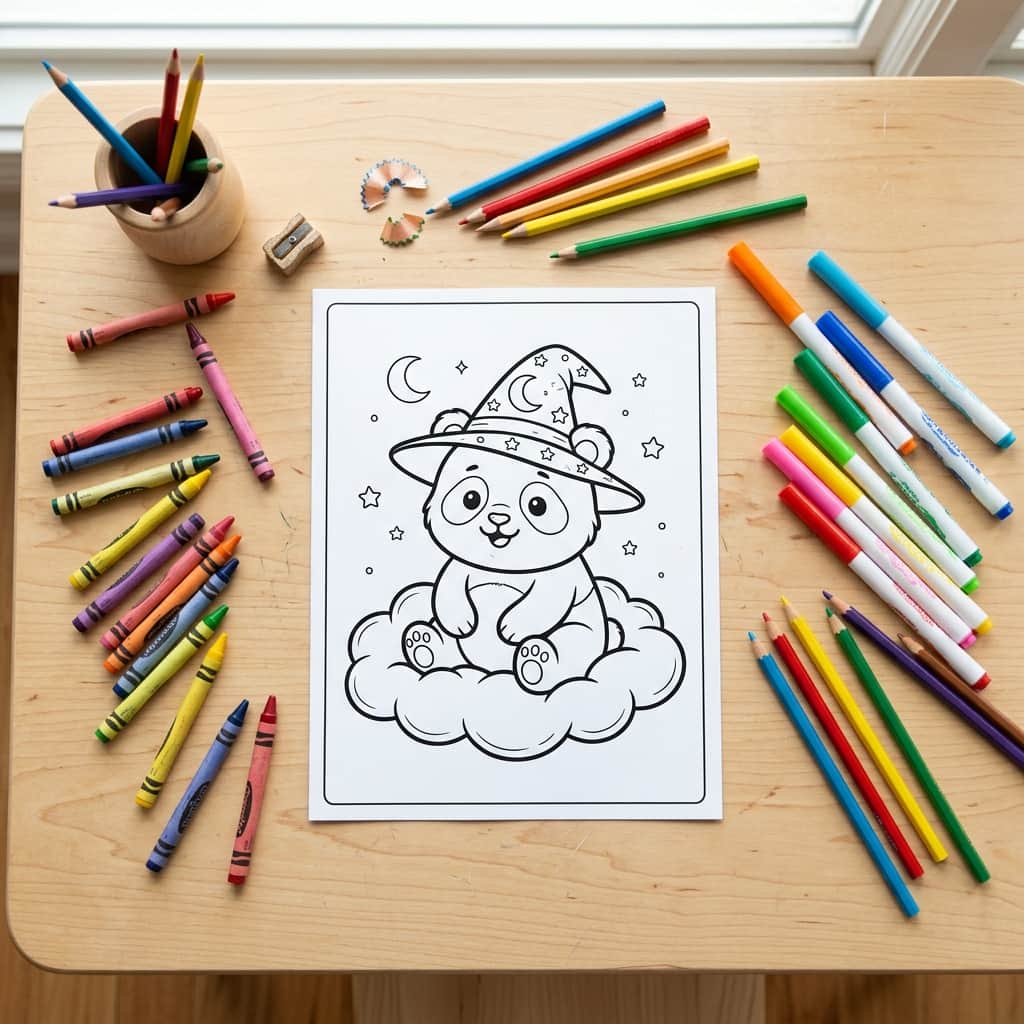
Rainy days, quiet afternoons, or cozy weekend mornings—keeping kids entertained without handing them an iPad or a TV remote can feel like a full-time challenge. Standard store-bought coloring books are fine, but kids eventually run out of pages, or they get bored coloring the same repeating cartoon characters. What if you could design a personalized coloring page featuring exactly what they want to color right this second? Does your granddaughter want a picture of a "cute baby panda wearing a wizard hat flying on a cloud"? Or does your son want a "futuristic space car racing on Mars"? With artificial intelligence, you can generate custom, high-quality, and completely free printable coloring pages in seconds, print them on demand, and enjoy screen-free family time together.
Creating custom AI coloring pages for kids is not only cost-effective, but it also engages children in the creative design process. They become the "directors," naming characters, scenarios, and environments, while you operate the prompt engine to bring their ideas to life. In this comprehensive guide, we'll cover the best AI tools, age-appropriate prompting structures, troubleshooting tips, printing best practices, and creative gift ideas.
1. The Best AI Tools to Create Coloring Pages
Not all AI image generators are built equal when it comes to producing clean, black-and-white vector-style lines. Here are the top three tools you should use to create custom coloring outlines:
- Midjourney: Undeniably the best tool for clean, high-contrast black contours. Midjourney v6 has excellent line-art recognition. By using the
--style rawparameter, you can strip away the engine's default shading gradients and generate crisp, empty coloring spaces. - ChatGPT (DALL-E 3): The most accessible tool, available in ChatGPT Plus, Microsoft Copilot, or Bing Image Creator. It handles complex, descriptive scenes incredibly well. While it sometimes adds subtle gradients, its natural language comprehension means you can type a highly detailed story-driven prompt and get exactly what you want.
- Adobe Firefly: Ideal for vector-style output. Firefly's style controls allow you to select "Line Art" or "Sketch" presets, automatically forcing the AI to output clean black outlines on a pure white background. It is also trained on licensed stock photos, making it a safe choice for families who want to share their work commercially.
2. Age-Based Prompting: Matching Detail to Skill Levels
A common mistake when generating AI coloring pages for kids is using the same prompt style for all ages. A toddler will get frustrated with tiny, intricate lines, while a pre-teen will be bored by large, simple shapes. For the best user experience, use these age-targeted prompting strategies:
A. Toddlers & Preschoolers (Ages 2–4)
Toddlers need large, open coloring shapes, very thick black outlines, and minimal background clutter. Avoid complex patterns and focus on single, friendly characters.
"Simple coloring page for toddlers, thick lines, large coloring spaces, cute cartoon [subject], flat white background, no shading, minimal detail, bold outline --ar 4:5"
Toddler Prompt Examples:
- "Simple coloring page for toddlers, thick lines, large coloring spaces, cute cartoon baby puppy dog sitting down, flat white background, no shading, minimal detail, bold outline."
- "Simple coloring page for toddlers, thick lines, large coloring spaces, happy cartoon smiling sun in the sky with clouds, flat white background, no shading, bold outline."
- "Simple coloring page for toddlers, thick lines, large coloring spaces, friendly cartoon dump truck, flat white background, no shading, bold outline."
B. Young Kids (Ages 5–8)
At this stage, kids can handle moderate details and enjoy coloring small scenes that tell a story. You can introduce simple backgrounds, multiple characters, and playful actions.
"Coloring page for kids aged 6-8, clear black line art, cute [subject] in a [setting], white background, simple scenery, no color, no grays, no shading, clean outline --ar 4:5"
Young Kid Prompt Examples:
- "Coloring page for kids, clear black line art, cute happy Tyrannosaurus Rex dinosaur wearing boots walking next to a volcano, white background, simple scenery, no shading, clean outline."
- "Coloring page for kids, clear black line art, a magical princess castle with towers, cute fairy flying in front, white background, simple scenery, no shading, clean outline."
- "Coloring page for kids, clear black line art, a playful kitten playing with a ball of yarn in a cozy living room, white background, simple scenery, no shading, clean outline."
C. Tweens & Older Kids (Ages 9–12)
Older kids and teenagers love detailed patterns, intricate lines, and complex subjects. They can color fine textures, mandalas, doodle art, and full-bleed environmental scenes.
"Intricate coloring page for tweens, detailed line art, [subject], zen doodle style, complex patterns, black and white, white background, no shading, full-page design --ar 4:5"
Tween Prompt Examples:
- "Intricate coloring page for tweens, detailed line art, majestic lion head, zen doodle style, complex geometric patterns, black and white, white background, no shading."
- "Intricate coloring page for tweens, detailed line art, cozy wizard's library full of magical books, potions, and a sleeping owl, complex patterns, black and white, white background, no shading."
- "Intricate coloring page for tweens, detailed line art, futuristic cyberpunk city street with flying cars, complex structures, black and white, white background, no shading."
3. 12 Ready-to-Use Thematic Prompts
Here is a library of pre-tested, high-performance prompts organized by popular themes. Simply copy, paste, and run them in your favorite generator!
🦕 Dinosaur Theme
- "Coloring page for kids, cute baby Triceratops hatching from an egg, tropical jungle background, clean black lines, white background, no shading."
- "Coloring page for kids, long-necked Brachiosaurus eating leaves from a tall palm tree, sunny sky, clean black lines, white background, no shading."
- "Coloring page for kids, friendly cartoon Pterodactyl flying over mountains, clean black lines, white background, no shading."
👑 Princess & Fantasy Theme
- "Coloring page for kids, a beautiful princess sitting on a garden swing surrounded by flowers, clean black lines, white background, no shading."
- "Coloring page for kids, a magical unicorn jumping over a rainbow with stars, clean black lines, white background, no shading."
- "Coloring page for kids, a friendly forest wizard casting sparkles from a wooden wand, clean black lines, white background, no shading."
🦸 Superhero & Sci-Fi Theme
- "Coloring page for kids, a heroic cartoon boy superhero wearing a cape flying above city skyscrapers, clean black lines, white background, no shading."
- "Coloring page for kids, a cool robot waving hello in a high-tech science laboratory, clean black lines, white background, no shading."
- "Coloring page for kids, a fast rocket ship blasting off into space surrounded by stars and planets, clean black lines, white background, no shading."
🌲 Nature & Animals Theme
- "Coloring page for kids, a cute red panda climbing a bamboo branch, forest setting, clean black lines, white background, no shading."
- "Coloring page for kids, a majestic sea turtle swimming through coral reefs with tropical fish, clean black lines, white background, no shading."
- "Coloring page for kids, a cozy forest clearing with a deer, squirrel, and rabbit sitting together, clean black lines, white background, no shading."
4. Troubleshooting Common AI Line-Art Issues
Sometimes, the AI doesn't give you a perfect white-and-black output on the first try. Here is how to fix the most common issues:
- Issue: The background is grey, shaded, or textured.
Solution: If you are using Midjourney, add a strict negative prompt like--no grays, shading, shadows, 3D render. In ChatGPT/DALL-E, explicitly state, "The background must be solid, pure white paper with absolutely no grey pixels or shadow gradients." - Issue: The lines are too thin, blurry, or pixelated.
Solution: Add the terms "bold black outlines" or "crisp vector line art" to the prompt. Make sure to upscale the image (to at least 2K resolution) using free online tools like Upscale.media before printing. - Issue: The AI adds colors or colored elements.
Solution: Make sure the word "coloring page" is placed at the very beginning of the prompt. Add a negative prompt for colors (e.g.,--no color, red, blue, green).
5. Print Tips: How to Get Professional Studio Results
Once you have generated your custom coloring sheets, the final step is printing. To make sure crayons glide smoothly and markers don't ruin your kitchen table, follow these printing best practices:
- Choose the Right Paper:
- Standard Printer Paper (20lb): Perfectly fine for crayons, colored pencils, and quick sessions.
- Heavy Cardstock (65lb to 80lb): Essential if your kids are using alcohol markers, gel pens, or light watercolors. It prevents ink bleed-through and handles saturation without wrinkling.
- Printer Configuration Settings:
- Mode: Set your print driver to "Grayscale" or "Black and White Only". This forces the printer to use pure black pigment ink instead of mixing color ink to form dark greys.
- Resolution: Print at "Best" or "High Quality" (300 DPI or higher) to ensure lines are razor-sharp.
- Sizing: Check the box for "Fit to Page" or "Scale to Fit" to prevent the borders of the AI image from getting clipped off.
6. Creative Gift Ideas: Beyond the Basic Printer Paper
Instead of just stacking loose printed sheets, turn your custom AI coloring pages into lasting family keepsakes and interactive crafts:
- Laminated Dining Placemats: Print a custom page featuring your child's favorite things (or a personal message like "Happy Birthday, Emma!"). Run the sheet through a standard thermal laminator. Kids can color it at the dinner table using dry-erase markers, wipe it clean, and reuse it daily.
- Custom bound coloring book: Group 15–20 generated pages together. Create a colored cover page out of heavy cardstock with custom text and graphics. Bind the left edge using a three-hole punch and decorative yarn, or bind it at a local print shop with a plastic comb. It makes an excellent, personalized holiday gift.
- Framed nursery art: Have your child color a high-detail page of their favorite animal or landscape. Once complete, write their name and date in the corner, and put it in a clean matted picture frame. It's a premium piece of bedroom wall art that showcases their creativity.
Frequently Asked Questions (FAQ)
Q: Do I need a paid subscription to make AI coloring pages?
A: No! While Midjourney requires a paid plan, you can generate beautiful coloring pages for free using tools like Bing Image Creator (which runs DALL-E 3), Canva's free AI assistant, or Adobe Firefly's free monthly credits.
Q: Can I sell the coloring pages I generate?
A: Yes, generally. If you have a paid subscription to Midjourney or use Adobe Firefly, you own the commercial rights to the generated images. However, ensure your prompts do not include copyrighted characters (like Mickey Mouse, Mario, or Elsa) if you plan to sell them on marketplaces like Etsy.
Q: How do I remove grey background shading if my printer prints it?
A: You can open the image in any free image editor (like Photopea or Canva) and adjust the "Contrast" slider to 100%. Alternatively, increase the "Exposure" or "Whites" slider until the background turns completely white, leaving only the dark outline lines intact.
Conclusion
AI has unlocked an endless stream of personalized, creative craft possibilities. By asking children what they want to see, constructing structured prompts matching their age group, and configuring your home printer properly, you can deliver endless, screen-free entertainment tailored to their imagination. Grab a box of crayons, fire up your generator, and start creating together!